
How to Switch Your DMS Without Losing Deals, Payment History, or Momentum (A BHPH Owner's Guide)
A BHPH owner's guide to switching dealer management software without losing active deals, payment history, or momentum — plan, migrate, verify balances, go live.

If you run a Buy-Here-Pay-Here store, the real reason you've stayed on a DMS you've outgrown probably isn't the software — it's the horror story. The conversion that goes sideways, and Monday morning a customer asks for their payoff and you can't give them a straight answer. That fear is fair. But staying put has its own price: manual double-entry, reports that tell you nothing, thin audit trails that make renewal time nervous — often on a bill for software that hasn't meaningfully changed in years (Dealer Tech Nerd).
Here's the reframe worth saying out loud: switching your DMS isn't a leap off a cliff. It's a project — and projects you can plan. Here's how to make the move without losing active deals, payment history, or momentum.
1. Stop treating it like a leap — treat it like a plan
The dealers who get burned are almost always the ones who improvised. The ones who come out clean ran it like any other operational project: an owner, a timeline, and a checklist.
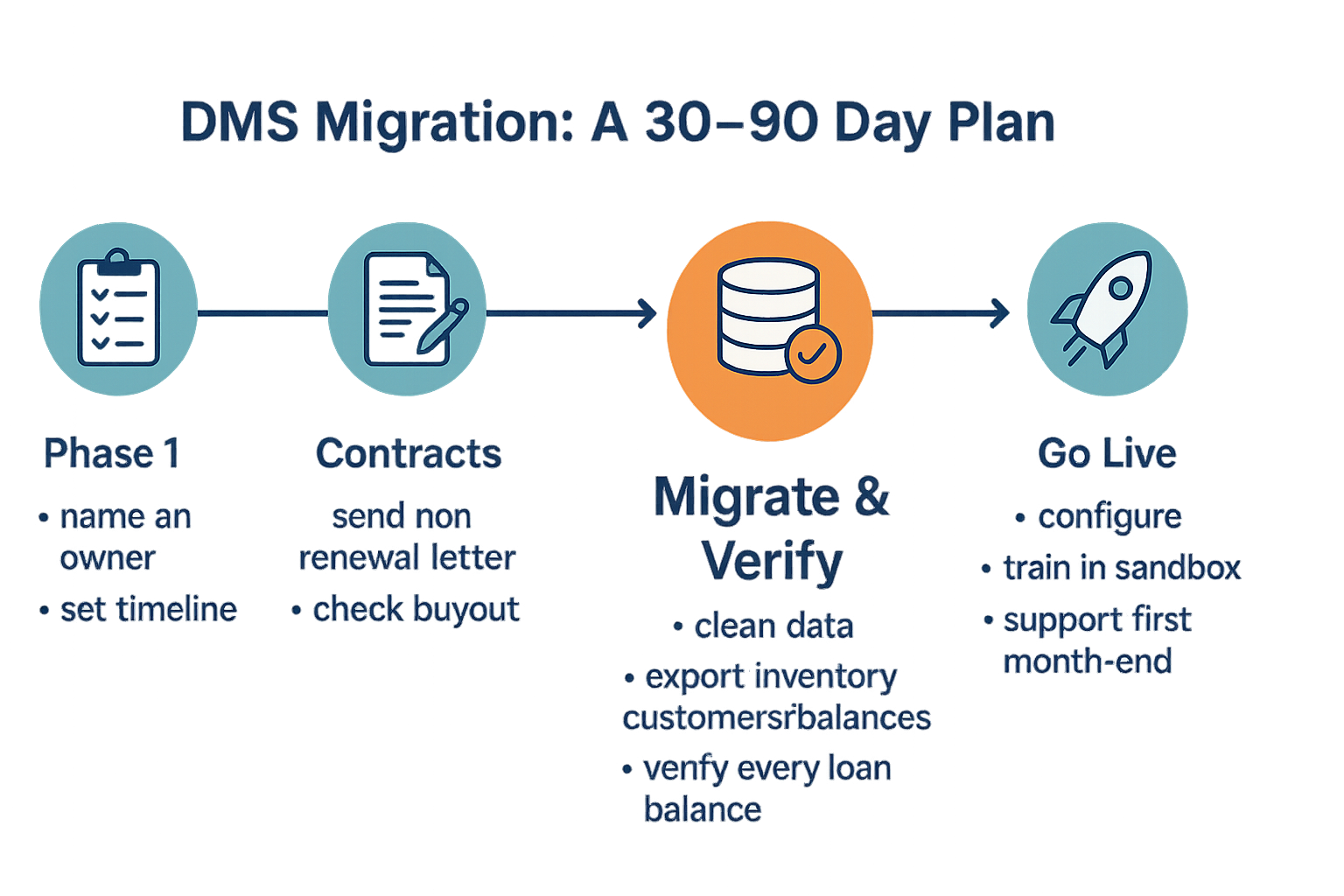
Name one internal owner — usually you, or your strongest office person — who keeps the move on track. Set a realistic window. For an independent BHPH store, a clean cut-over is often a 30-to-90-day project; bigger or messier data can push it longer (Dealertrack). The point isn't to rush it. It's to give the work a shape so nothing falls through.
2. Handle the boring contract stuff first
Before you touch any data, deal with your current contract. A lot of DMS agreements auto-renew, and a lot of dealers get surprised by it. Send your termination or non-auto-renewal letter early so you don't get locked into another term, and check whether canceling before your official end date triggers a buyout — some shops have staggered agreements with more than one end date (SoftBase).
This is the unglamorous step everyone wants to skip. Do it first and you save yourself a headache — and possibly a check you didn't budget for.
3. Migrate the data cleanly — and verify every balance
This is the part that matters most for a BHPH store, because your data is your business. Get it right and the rest is easy.
Start by cleaning what you've got. Dedupe, fix the obvious errors, standardize your formatting, and flag the fields you already know won't carry over before you start moving anything. Garbage in, garbage out (TVI). Then export everything you'll need:
- Inventory as a CSV — VINs, pricing, mileage
- Your full customer database
- Your BHPH payment schedules and current balances — the heart of the portfolio
- Vehicle photos, organized by VIN or stock number
- Document images and archives — these get forgotten constantly
Then the BHPH non-negotiable: verify every migrated loan balance and payment schedule against your old system before you go live. Don't assume it transferred right — check it. This single step is what stands between you and that Monday-morning conversation you're dreading (Leftlane). One more thing to expect: it won't be apples-to-apples. The new screens look different and fields sit in different places — that's normal, not a sign something's broken (Cox Automotive).
4. Go live without losing momentum
Go-live isn't a light switch — it's a short, planned hand-off. Before the day comes, get the new system set up the way you actually run: your dealer profile, tax rates, deal templates, and user roles. Train your people in a sandbox so they can make their mistakes somewhere harmless, not on a live customer's account (AutoRaptor).
Plan for a short adjustment week — most teams find the new workflow within a few days. And line up support for your first month-end, since that's when the questions surface. Lean on leadership for this part: the moves that go smoothly are the ones where the owner is visibly bought in and communicating (DealerTeam).
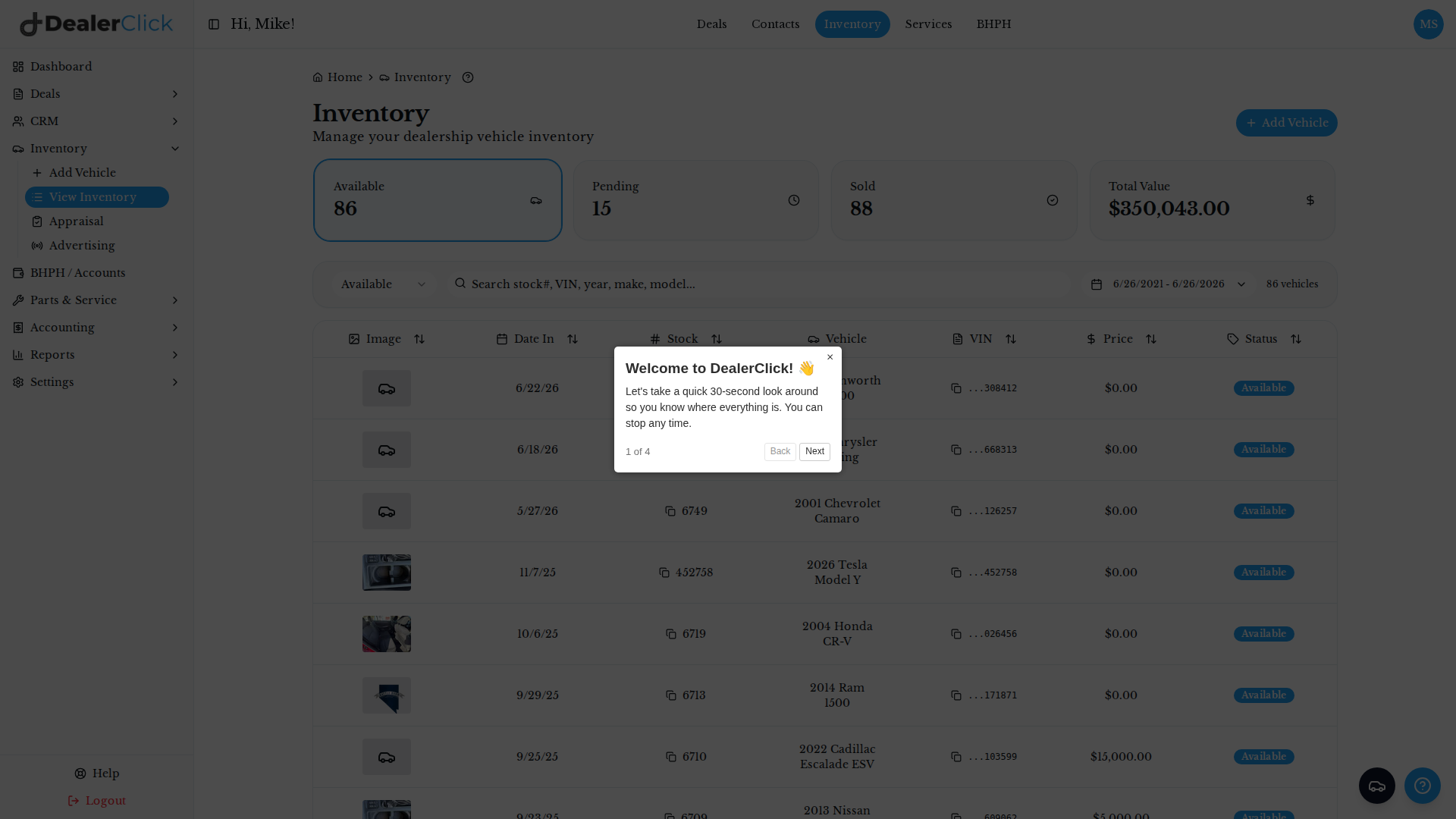
What makes the hand-off easier is landing in one system instead of a patchwork. In DealerClick, your day-to-day lives together — inventory, CRM and leads, deals and desking, customer financing applications, and your service department — in a single workspace [capabilities]. Your inventory list shows real-time stat cards for Available, Pending, and Sold vehicles plus the total value of current stock, and you can filter and search by stock number, VIN, year, make, or model [capabilities].
5. How DealerClick supports a clean switch
DealerClick is built to be the place a BHPH operation lands and stays. It's a dealer management system that brings inventory, CRM, deals, credit applications, and service into one platform, with product lines for BHPH and other independent dealers [capabilities].
A few things that earn their keep once you're moved in:
- Deals and desking in one pipeline that ties each customer to a vehicle, with stat cards for Pending, Sold, and Funded [capabilities].
- Credit applications captured and tracked from New through Pending, Approved, Denied, and Converted — so financing apps don't live in a drawer [capabilities]. (DealerClick doesn't approve financing or set rates; the lender does — figures are estimates until then [capabilities].)
- The Quote Wizard, which matches a shopper's income, credit, and target monthly payment to vehicles they can actually afford, with estimated payments [capabilities].
- KBB and MMR book values right in each vehicle's record to help you price competitively (reference values, not a guaranteed sale or trade number) [capabilities].
- Inventory advertising that syndicates per vehicle to platforms like AutoTrader, Cars.com, and Facebook, so your lot keeps moving while you settle in [capabilities].
The switch is real work — there's no pretending otherwise. But it's planned work, not a gamble. Clean your data, verify your balances, train your people, and pick a system built for the way a BHPH store actually runs.
See exactly how your store would make the move. Book a demo and our team will walk you through it — deals, customers, and payment history included.
Stay Updated
Get the latest auto dealer insights delivered straight to your inbox.
No spam. Unsubscribe anytime.